Back up important files. Save your work and record the exact message before changing anything. If Windows cannot start, see the startup guide.
Work through these checks
0 of 4 complete01Check which drive is short of space
- Open File Explorer → This PC and inspect the free space on the Windows drive.
- Read the update prompt for the amount or location of space it requires.
You know which drive needs attention.
If it does not helpIf the prompt concerns a different partition, do not resize partitions without specific guidance.
02Review cleanup recommendations
- Open Settings → System → Storage → Cleanup recommendations.
- Inspect each proposed deletion before selecting it. Move important personal files to a verified backup instead of deleting them.
Removing previous Windows installation files can remove rollback options. Do not select Downloads or other personal data without reviewing it.
The available space increases after removing items you no longer need.
If it does not helpIf space remains low, inspect large installed applications and personal files.
03Retry the update
- Return to Windows Update after cleanup.
- If Windows offers an external-storage option for the update, follow its on-screen instructions and keep that drive connected as requested.
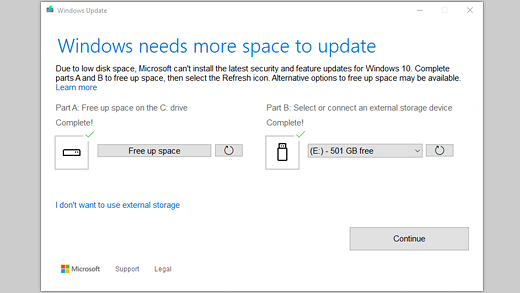
The update can proceed with the required working space.
If it does not helpRecord the remaining storage requirement if it still cannot continue.
04Prepare a focused support request
- Collect the KB number, Windows build, failure time, and checks already tried.
- Use the support link for that specific update or contact your organisation’s IT team if the computer is managed. Share logs privately only after checking them for personal data.
Support can distinguish this incident from unrelated failures with the same numeric code.
If it does not helpKeep the backup and the original error details; avoid undocumented registry or partition changes.
Possible causes
- Low physical storage capacity on system drive C:
- Excessive update backup files (Windows.old directory)
- Temporary folder clutter and download cache files
- Too small system reserve partition allocated
Useful Windows tools
These commands open Windows tools. Review changes before applying them.
cleanmgr.exeWas this helpful?
Your progress is saved on this device.